High volume phishing campaign uses Microsoft 365 outage lures to target multiple industry sectors
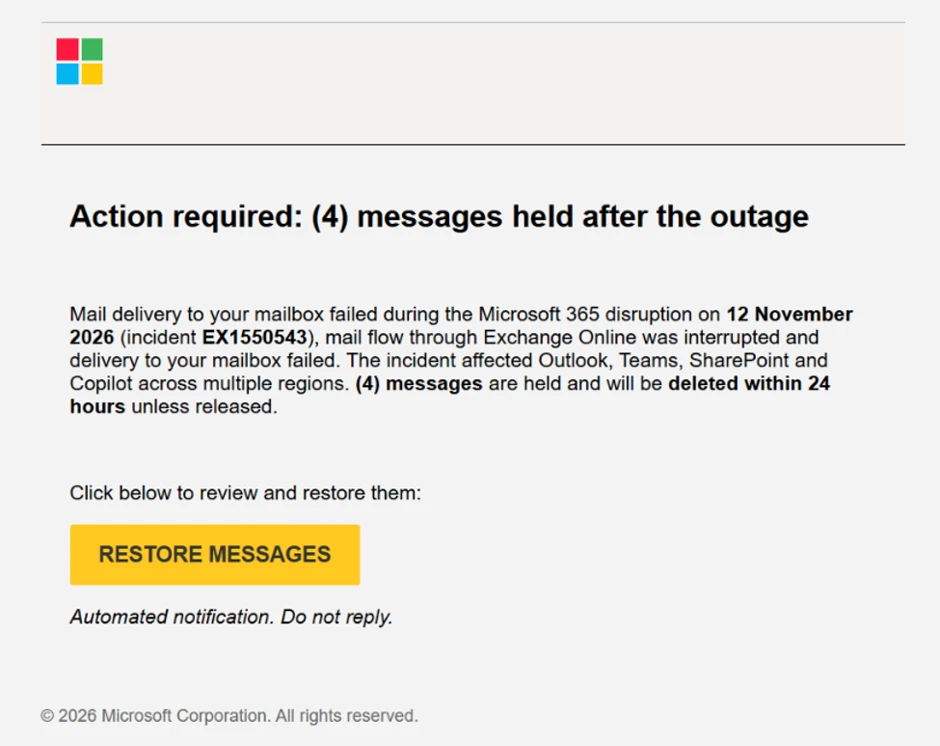
On November 13, 2026, Microsoft Threat Intelligence observed a coordinated, high-volume phishing campaign targeting organizations across multiple sectors worldwide. The threat actors used phishing emails disguised as legitimate Microsoft 365 service-health notifications to lure recipients into clicking a malicious link. The messages created a false sense of urgency by claiming that emails had been held during a service disruption and would be deleted within 24 hours unless the recipient took action to restore them. This is consistent with historical attacker campaigns which continuously look for notable global events to exploit in their social engineering lures.
Microsoft identified the threat actor’s use of specific sender domain names, randomized outage subjects, recipient-specific tracking links, and a common non-Microsoft destination to make the messages appear relevant while complicating simple pattern matching. We assess that the activity was likely credential phishing; however, the available evidence does not confirm credential capture, malware delivery, or post-compromise activity. Multiple threat actors may continue to look for ways to exploit notable global events in any social engineering pretext.
If credentials were entered, organizations should consider the risk of account compromise, mailbox access, business email compromise, internal phishing, inbox-rule manipulation, and access to cloud collaboration data. Microsoft Defender blocks malicious domains used in this campaign, and Microsoft Defender for Office 365 blocks and quarantines phishing emails. We will continue to monitor this campaign and other related threats. Security teams can use Microsoft Defender for Office 365 and Microsoft Defender XDR capabilities to investigate messages, URLs, clicks, and potential follow-on activity.
Phishing attack overview
Microsoft analyzed the email lures sent on November 13, 2026: the emails used the subject pattern “Outage – <random token>” and display names built from a three-character, organization-style prefix followed by “Outage Notification” or “Service Health.”
Example subject line:
- Outage – aF7vG6
Example display names:
- MSF Outage Notification
- AMZ Service Health
One example email body referenced a purported Exchange Online incident on November 12 and claimed that four messages were held after the outage. The urgency of a 24-hour deletion deadline and the prominent “RESTORE MESSAGES” call to action were intended to drive immediate interaction.
The activity used distinct sender domains, including: moments-notice[.]com, planetmaison[.]com and newbooker[.]com. The messages also used email-delivery and link-tracking infrastructure to generate recipient-specific URLs. In multiple samples, click-tracking links led to reallifeaccounting[.]com or reallifeaccounting[.]com/themelist0.html.
The sample set was link-based: no QR codes or non-EML attachments were observed, and Microsoft did not identify evidence of executable, archive, document, or other malware payload delivery. The off-brand destination and Microsoft 365 impersonation support an assessment of likely credential phishing, but the available evidence did not include the final page source, credential fields, credential-submission telemetry, or post-compromise activity. Microsoft therefore has not attributed the campaign to a named threat actor or malware family.
Attack chain overview

- Delivery: A user receives an email from the moments-notice[.]com, planetmaison[.]com or newbooker[.]com sender-domain cluster. The subject contains “Outage -” followed by a randomized string of character tokens. The body of the message includes a fake email conversation positioned to be hidden from the recipient and appears to be an attempt at mail filtering evasion.
- Impersonation: The message poses as a Microsoft 365 service-health notification, uses a target-specific display-name prefix, and references Exchange Online, Outlook, Teams, SharePoint, and Copilot.
- Social engineering: The lure claims that messages were held during an outage and will be deleted within 24 hours, creating urgency and fear of lost business email.
- User interaction: The recipient selects “RESTORE MESSAGES” or “TAKE ACTION”. A recipient-specific tracking URL records or routes the click.
- Redirect: The observed link chain leads to reallifeaccounting[.]com, including the path /themelist0.html in some samples.
- Assessed threat actor objectives: Microsoft assesses that the activity was likely intended to capture credentials. Credential submission and subsequent account compromise were not directly observed in the supplied evidence.
Mitigation and protection guidance
Immediate actions
Messages in environments protected by Microsoft Defender for Office are currently blocked/quarantined, and we have not observed any indicators of compromise from this attack.
However, organizations can consider taking the following steps:
- Search for and remove phishing messages. Search mail telemetry for the observed sender domains, display-name and subject patterns, lure phrases, tracking hosts, and destination domain. Quarantine matching messages and remove delivered copies in accordance with organizational response procedures.
- Identify users who clicked campaign links. Identify users who selected campaign links. Review click telemetry, proxy logs, and browser or endpoint evidence to determine whether the destination was reached and whether credentials may have been entered.
- Reset credentials and investigate potentially compromised accounts For any user who may have entered credentials, reset the password, revoke active sessions and refresh tokens, and verify multifactor authentication registrations. Review the account for suspicious sign-ins, OAuth consent, new inbox or forwarding rules, delegate permissions, and unusual access to Exchange Online, SharePoint, OneDrive, or Teams.
- Block or closely monitor campaign infrastructure. Block or closely scrutinize reallifeaccounting[.]com and the observed /themelist0.html path while the activity is investigated. Avoid broadly blocking shared email-delivery infrastructure based only on this campaign; combine sender, content, URL, and behavioral signals to reduce collateral impact.
- Remind users how to verify legitimate service-health communications. Remind users that legitimate Microsoft 365 service-health communications do not direct them to non-Microsoft domains to recover held mail. Validate service issues through the Microsoft 365 admin center rather than through unsolicited email links.
Ongoing hardening
- Require multifactor authentication and prioritize phishing-resistant methods, such as passkeys or security keys, where possible.
- Review and enable Safe Links and Safe Attachments policies in Microsoft Defender for Office 365.
- Enable Zero-hour auto purge (ZAP) to help retroactively neutralize phishing, spam, or malware messages that were delivered before new threat intelligence became available.
- Use Attack simulation training and ongoing awareness guidance to help users recognize outage-themed urgency, sender-domain mismatches, and requests to restore or release messages.
- Encourage users to report suspicious messages through the organization’s established Outlook reporting workflow so security teams and Microsoft can investigate quickly.
Microsoft Security Copilot
Security Copilot customers can use the standalone experience to create their own prompts or run the following prebuilt promptbooks to automate incident response or investigation tasks related to this threat:
- Incident investigation: Summarize related alerts and incidents and identify the affected users and devices.
- Microsoft User analysis: Review the activity of users who selected the campaign links. This includes sign-ins, MFA-method changes, inbox or forwarding rules, and OAuth grants.
Note that some promptbooks require access to plugins for Microsoft products such as Microsoft Defender XDR or Microsoft Sentinel.
Microsoft Defender XDR Threat analytics
High volume phishing campaign uses Microsoft 365 Outage lures to target multiple industry sectors.
Advanced hunting queries
These sample queries search for campaign characteristics in Microsoft Defender XDR. Review the results in the context of your environment and adjust the indicators only after validation. The queries do not set a time range; use the advanced hunting time selector for the period you want to investigate.
Find messages by sender domain or subject pattern
This query searches for the observed sender-domain clusters and the randomized outage subject pattern.
let campaignDomains = dynamic([
    "moments-notice.com",
    "em4493.moments-notice.com",
    "newbooker.com",
    "em.newbooker.com"
]);
EmailEvents
| where SenderFromDomain in~ (campaignDomains)
    or Subject matches regex
        @"(?i)^(?:\[external\]\s*|\*external\*\s*)?outage\s*-\s*[a-z0-9]{6}$"
| project Timestamp, NetworkMessageId, RecipientEmailAddress,
    SenderFromAddress, SenderFromDomain, SenderDisplayName,
    Subject, DeliveryAction, DeliveryLocation
| order by Timestamp desc
Find messages containing campaign URLs
This query identifies message URLs that contain the observed destination, click-tracking hosts, or tracking-pixel pattern, and joins the results to message metadata.
let campaignUrlParts = dynamic([
    "reallifeaccounting.com",
    "u113727626.ct.sendgrid.net/ls/click",
    "url.newbooker.com/ls/click",
    "162.120.17.69:8080/t/v3."
]);
EmailUrlInfo
| where Url has_any (campaignUrlParts)
| project NetworkMessageId, Url, UrlDomain, UrlLocation
| join kind=inner (
    EmailEvents
    | project Timestamp, NetworkMessageId, RecipientEmailAddress,
        SenderFromAddress, SenderFromDomain, SenderDisplayName,
        Subject, DeliveryAction, DeliveryLocation
) on NetworkMessageId
| project Timestamp, RecipientEmailAddress, SenderFromAddress,
    SenderFromDomain, SenderDisplayName, Subject, Url, UrlDomain,
    UrlLocation, DeliveryAction, DeliveryLocation, NetworkMessageId
| order by Timestamp desc
Investigate user clicks on campaign URLs
This query searches click telemetry for the observed destination and tracking patterns so investigators can identify affected users and determine whether clicks were allowed.
let campaignUrlParts = dynamic([
    "reallifeaccounting.com",
    "u113727626.ct.sendgrid.net/ls/click",
    "url.newbooker.com/ls/click",
    "162.120.17.69:8080/t/v3."
]);
UrlClickEvents
| where Url has_any (campaignUrlParts)
| project Timestamp, AccountUpn, Url, ActionType, Workload,
    NetworkMessageId, IPAddress, IsClickedThrough, UrlChain
| order by Timestamp desc
For users who interacted with campaign links, also investigate:
- Unusual sign-ins
- New devices or user agents
- MFA-method changes
- OAuth grants
- Inbox or forwarding rules
- Delegate permissions
- Unusual access to mailbox or collaboration data
These behaviors were not observed in the source messages, they are post-click investigation targets for suspected Microsoft 365 credential phishing.
MITRE ATT&CK Techniques observed
The activity exhibited the following techniques. Microsoft did not map credential capture, malware execution, command and control, or data exfiltration because the available evidence did not directly demonstrate those actions.
Initial Access
- T1566.002 Phishing: Spearphishing Link | Messages contained a “RESTORE MESSAGES” link that used tracked redirect URLs and led to a non-Microsoft destination.
Defense Evasion
- T1036 Masquerading | Messages impersonated Microsoft 365 service-health communications and used Microsoft product names and copyright language.
Execution
- T1204.001 User Execution: Malicious Link | Recipients were urged to select a link within 24 hours to prevent the alleged deletion of held messages.
Indicators of Compromise (IOCs)
The following defanged indicators were observed in the campaign and should be validated in the context of each environment before blocking. Shared service-provider infrastructure can generate false positives when used without the accompanying sender, content, and behavioral signals.
| Indicator | Type | Context | |
| moments-notice[.]com | Domain | Observed sender-domain cluster. | |
| planetmaison[.]com | Domain | Observed sender-domain cluster. | |
| em4493[.]moments-notice[.]com | Domain | Observed mail-from or bounce subdomain. | |
| newbooker[.]com | Domain | Observed sender-domain cluster. | |
| em[.]newbooker[.]com | Domain | Observed mail-from or bounce subdomain. | |
| url[.]newbooker[.]com | Domain | Observed click/open tracking host. | |
| url7489[.]newbooker[.]com | Domain | Observed click/open tracking host. | |
| u113727626[.]ct[.]sendgrid[.]net | Domain | Observed click/open tracking host; assess with campaign context because the parent service can be shared. | |
| u118254266[.]ct[.]sendgrid[.]net | Domain | Observed click/open tracking host; assess with campaign context because the parent service can be shared. | |
| u118250677[.]ct[.]sendgrid[.]net | Domain | Observed click/open tracking host; assess with campaign context because the parent service can be shared. | |
| reallifeaccounting[.]com | Domain | Principal downstream destination observed in multiple messages. | |
| outagefixed[.]sbs | Domain | Downstream destination observed in some messages. | |
| outagerestored[.]sbs | Domain | Downstream destination observed in some messages. | |
| hxxps://reallifeaccounting[.]com/themelist0[.]html | URL | Observed destination path. | |
| hxxps://outagerestored[.]sbs/topics_pxyk/themelist0[.]html | URL | Observed destination path. | |
| 162[.]120[.]17[.]69:8080 | IP and port | Observed host for individualized /t/v3…/px[.]png resources. | |
| Outage – <random> | Subject pattern | Observed randomized subject format; external-mail tags may precede it. | |
| Strengthen – Security <random> | Subject pattern | Observed randomized subject format; external-mail tags may precede it. | |
| Restore — 4 messages <random> | Subject pattern | Observed randomized subject format; external-mail tags may precede it. | |
References
- Safe Links in Microsoft Defender for Office 365
- Safe Attachments in Microsoft Defender for Office 365
- Zero-hour auto purge in Microsoft Defender for Office 365
- Attack simulation training in Microsoft Defender for Office 365
- MITRE ATT&CK T1566.002: Phishing – Spearphishing Link
- MITRE ATT&CK T1036: Masquerading
- MITRE ATT&CK T1204.001: User Execution – Malicious Link
Learn More
For the latest security research from the Microsoft Threat Intelligence community, check out the Microsoft Threat Intelligence Blog.
To get notified about new publications and to join discussions on social media, follow us on LinkedIn, X (formerly Twitter), and Bluesky.
To hear stories and insights from the Microsoft Threat Intelligence community about the ever-evolving threat landscape, listen to the Microsoft Threat Intelligence podcast.
Review our documentation to learn more about our real-time protection capabilities and see how to enable them within your organization.
- Learn more about securing Copilot Studio agents with Microsoft Defender
- Evaluate your AI readiness with our latest Zero Trust for AI workshop.
- Microsoft 365 Copilot AI security documentation
- How Microsoft discovers and mitigates evolving attacks against AI guardrails
- Prompt injection protection in Microsoft Defender for Office 365 – official documentation of the prompt injection protection in Microsoft Defender for Office 365.
- How Microsoft discovers and mitigates evolving attacks against AI guardrails | Microsoft Security Blog
- Manipulating AI memory for profit: The rise of AI Recommendation Poisoning | Microsoft Security Blog – a related example of an AI-era technique observed in email traffic
- Defending the inbox against prompt injection attacks | Microsoft Defender for Office 365 Blog – feature announcement introducing prompt injection protection in Microsoft Defender for Office 365.
- Learn how Microsoft is reimagining the SOC for the agentic era with ISOC in Microsoft Defender
Originally published on Microsoft Security Blog