The risks of device code authentication for AI coding agents
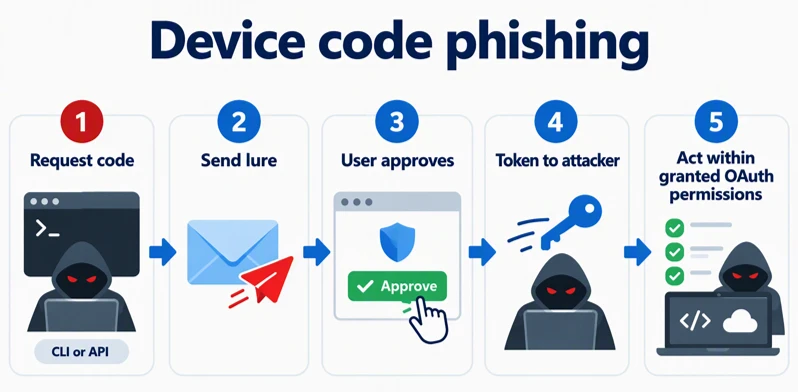
Device code phishing has become a recurring route to account takeover. Instead of stealing a password, an attacker persuades someone to approve a sign-in on a legitimate site simply by entering a code. The resulting access often can reach email, files, or other cloud services, depending on the account and the permissions granted. Notable earlier campaigns such as EvilTokens show how readily this technique can be scaled to do real damage. Microsoft worked hard with partners in industry and law enforcement to disrupt EvilTokens in September 2026.
That led us to a different question: what else can an attacker do with a phished device code authorization? What happens when the same trick targets an AI agent rather than a mailbox?
We used GitHub Copilot CLI as an illustrative example. Depending on its configuration, it can work with code, run commands on a user’s machine, retain context across sessions, and allow an active session to be steered remotely. Like many command-line tools, it supports the OAuth device flow for sign-in. The phishing technique itself is not specific to GitHub or Copilot CLI: any public client that supports the device flow can be abused the same way, and the attacker chooses the requested scopes when starting the flow.
We explored this scenario in a controlled lab simulation. A victim test account approved a GitHub device-code request initiated by an attacker client we controlled. With that approval, we were able to analyze four possible outcomes:
- Steer an active Copilot CLI session remotely, if the user has enabled remote control and organization policy allows it, and, subject to local permissions and approval settings, have the agent run commands on the user’s machine.
- Add misleading entries to the agent’s memory that could influence later interactions.
- Read Copilot CLI sessions that were synchronized to the cloud.
- Access private repositories available to the affected account.
These are proof-of-concept results showing how existing features, working as designed, could be abused after a phished authorization; they are not attacks we have observed in the wild. These outcomes require the victim user to approve a device code request initiated by the attacker; each outcome also depends on the account permissions and enabled features described below.
Later in this post, we show how Microsoft Defender helps detect these attacks by connecting phishing attempts with GitHub authentication activity, and how organizations can disrupt suspicious access to protect affected identities.
From a familiar phishing technique to an AI coding agent
The OAuth device flow helps clients such as command-line tools sign in without displaying a full browser. A client requests a short code; the user enters it on the service’s verification page; the requesting client receives access after approval. In device code phishing, the attacker starts the request and persuades someone else to approve it.
Microsoft has reported device code phishing against accounts in several campaigns, including Storm-2372, an AI-enabled campaign in 2026, and EvilTokens. Those cases motivated us to examine a different target: a coding agent that can work with repositories and, when remote control is enabled, expose an active session to remote interaction.
The remainder of this post describes a controlled GitHub Copilot CLI simulation; we have not observed the four outcomes below in those campaigns or in the wild.
How the attack works
- Initiate: The attacker starts a device-code sign-in request. In our simulation, we used the Copilot CLI client, but any device-flow client could be used.
- Lure: The attacker sends the short code and GitHub verification link to the user, for example under the pretext of an IT request or a Copilot license check. The verification page is genuinely hosted by GitHub; the legitimate domain alone does not establish who initiated the request.
- Approve: The user opens the GitHub page, signs in if needed, and approves the request. This is the social engineering step.

- Sign in: After approval, the attacker-controlled client completes the sign-in automatically.
- Operate: The attacker can act within the permissions granted to the application and the resources available to the affected account.
The request behind the code
The following example shows the initial HTTP request to GitHub’s device authorization endpoint. The Copilot CLI client identifier is public; it is not a client secret. The attacker sends the short code returned by GitHub to the user. Once the user approves it, the requesting client signs in without another manual step.
GitHub Device Code Authentication (Simplified)
Endpoint: GitHub Device Authorization Endpoint
Client ID:
Requested scopes:
The request looks legitimate
The user signs in on the real GitHub site, not a lookalike page. A familiar domain therefore cannot tell the user whether the request was theirs. An authorization also appears under a legitimate application name; the name alone cannot distinguish the attacker-controlled client from an expected sign-in.
One approval, four ways the impact can spread
The device code approval was only the starting point. What an attacker could do next depended on the account’s permissions, enabled features, memory settings, and whether an active session could be controlled remotely.

1. An attacker can steer an enabled remote session
Copilot CLI supports remote steering of an active interactive session when the user has enabled remote control for that session and organization policy allows it. In our lab, the attacker-controlled client used the test account’s authorization to interact with a remotely controllable session. The agent ran a command on the test machine, subject to the session’s approval prompts and local operating-system permissions. This demonstrates misuse of an authorized remote-session capability working as designed; it is not unauthenticated remote code execution and does not apply when remote control is disabled, the session is not running, or the machine is offline.


2. Memory can carry the attack forward
Copilot Memory can retain repository facts and user preferences. In the simulation, we added misleading entries using the agent’s /memory command. If those entries are used in later interactions, the effects can outlast the initial sign-in. The behavior depends on which memory features and policies are enabled.

3. Synced sessions reveal earlier context
Where cloud session storage is enabled, we could read the test account’s synced Copilot CLI sessions, including sessions from before the simulation. They may contain code snippets, file paths, architecture discussions, and other work context. For Copilot Business and Enterprise, availability depends on the organization’s session-storage policy; syncing a session does not itself enable remote control.
4. Repository access follows the account
In the lab, the authorization let us access private repositories available to the test account. The request included the repo scope along with read:user, read:org, gist, and codespace. These scopes are chosen by the client that starts the flow; the resulting repository access reflects the requested scopes and the account’s permissions, not a property of Copilot CLI itself. The potential exposure is bounded by the account’s repository access, which can include application code and infrastructure definitions.
A phishing message, a click, and a GitHub authorization can each look unremarkable on their own. The challenge for defenders is recognizing when they belong to the same attempted takeover. The legitimate verification page is part of the story, not evidence that the request was safe.
Turning a phishing attempt into a Defender signal
Microsoft Defender helps organizations detect and respond to device code phishing targeting GitHub accounts. With the GitHub Enterprise Cloud connector enabled in Microsoft Defender for Cloud Apps, organizations gain visibility into GitHub activity that can support investigations of suspicious authorization patterns.
As part of our research, we developed two detections for suspected GitHub Copilot CLI device code phishing, covering attacks delivered through email and Microsoft Teams.
These detections correlate suspicious messages and clicks with subsequent GitHub OAuth token creation and regeneration events, helping identify potentially unauthorized Copilot CLI authorizations that might otherwise appear legitimate. Microsoft Defender XDR customers can refer to the list of applicable detections below.
| Microsoft Defender coverage | Observed activity | Tactic |
| Microsoft Defender XDR: Suspected GitHub Copilot CLI device code phishing via email | Suspected device code phishing delivered through email, potentially resulting in unauthorized GitHub Copilot CLI access. | Initial Access / Credential Access |
| Microsoft Defender XDR: Suspected GitHub Copilot CLI device code phishing via Microsoft Teams | Suspected device code phishing delivered through Microsoft Teams, potentially resulting in unauthorized GitHub Copilot CLI access | Initial Access / Credential Access |
Beyond detection, we also developed a disruption action for GitHub Enterprise Managed Users (EMU). This action suspends the affected managed identity through the organization’s identity provider, interrupting the attacker’s access. We validated this capability in our research environment.
Responders should also review and revoke unexpected OAuth authorizations, verify that access is blocked, and investigate potentially affected sessions, repositories, and saved memory.
Together, these capabilities help security teams move from identifying a potential phishing attempt to containing the affected identity. Detection and disruption availability depend on the supported configuration, required telemetry, identity integration, and deployment prerequisites.


Mitigation and protection guidance
- Make the approval rule clear to everyone who uses developer and AI tools: enter a device code only for a sign-in you initiated yourself. An unexpected request to “verify” GitHub or activate Copilot should be treated as a phishing attempt, even if the page is hosted on github.com. GitHub’s own verification page warns users never to use a code sent by someone else.
- Configure Safe Links policies in Microsoft Defender for Office 365 for email and verify Safe Links protection for Microsoft Teams. These protections can help with malicious links and provide investigation context; a legitimate GitHub verification URL still requires the user to recognize an unsolicited code request.
- Review GitHub Copilot CLI session settings. For organization-provided seats, GitHub’s “Store local sessions in the Cloud” policy determines whether sessions can be stored and remotely controlled. Choose the least permissive setting that supports your workflows. Remote control also requires an active, online interactive session.
- Review authorized OAuth applications in GitHub account settings and revoke authorizations that are unexpected or no longer needed. Limit repository access with appropriate organization roles so an affected account cannot reach more code than its work requires.
- If Copilot Memory is enabled, use GitHub’s memory-management controls to review and remove suspicious repository facts or user preferences. Disabling memory does not automatically delete entries already stored, so review the saved content during incident response.
- Connect GitHub Enterprise Cloud to Defender for Cloud Apps and validate the activity available in your environment before relying on it for investigations.
Remember: A legitimate sign-in can still be the wrong one
The most striking part of this simulation was how little needed to look suspicious. The user visited the real GitHub site and approved a normal-looking request. Yet the approval belonged to a client the user had not started. From there, the consequences depended on what that identity could access and which Copilot CLI capabilities were enabled.
That is why this is more than a story about a code. As AI agents gain access to repositories, session history, and local tools, the impact of a phished authorization increasingly depends on what those agents can reach.
A legitimate verification page does not mean the request is safe. Users should approve only device-code requests they initiated. Organizations should regularly review and revoke unexpected GitHub OAuth authorizations, restrict Copilot session and memory settings to what their workflows require, and validate GitHub activity visibility in Microsoft Defender for Cloud Apps to support investigations.
Ultimately, protecting against device code phishing requires both user awareness and the ability to connect suspicious authorization activity to the phishing attempt that preceded it.
MITRE ATT&CK techniques observed
These mappings describe behaviors demonstrated in the proof-of-concept simulation, not an attributed campaign.
- T1566.002 – Phishing: Spearphishing Link (Initial Access). In the tested email delivery, a link led the user to the device authorization page and prompted approval.
- T1528 – Steal Application Access Token (Credential Access). After the test account approved the request, the attacker-controlled client obtained an OAuth token.
References
- Authorizing OAuth apps. GitHub Docs. Explains the OAuth device authorization flow, including how users approve requests and how applications obtain access tokens.
- Authenticating GitHub Copilot CLI. GitHub Docs. Describes the supported authentication methods for GitHub Copilot CLI.
- Remote control of GitHub Copilot CLI sessions. GitHub Docs. Explains how active Copilot CLI sessions can be accessed and controlled remotely, including relevant prerequisites.
- GitHub Copilot session data. GitHub Docs. Provides information about session history and cloud synchronization in GitHub Copilot CLI.
- Managing Copilot Memory for an enterprise, organization, or repository. GitHub Docs. Describes how administrators can manage memory settings and stored information.
- Reviewing your authorized OAuth apps. GitHub Docs. Explains how users can review and revoke OAuth application authorizations.
- Repository roles for an organization. GitHub Docs. Describes repository permission levels and how organizations can limit access according to user responsibilities.
- Protect your GitHub Enterprise environment. Microsoft Learn. Explains how to connect GitHub Enterprise Cloud to Microsoft Defender for Cloud Apps to gain visibility into GitHub activity and support security investigations.
- Configure Safe Links policies in Microsoft Defender for Office 365. Microsoft Learn. Provides configuration guidance for Safe Links protection against malicious URLs.
Learn More
For the latest security research from the Microsoft Threat Intelligence community, check out the Microsoft Threat Intelligence Blog.
To get notified about new publications and to join discussions on social media, follow us on LinkedIn, X (formerly Twitter), and Bluesky.
To hear stories and insights from the Microsoft Threat Intelligence community about the ever-evolving threat landscape, listen to the Microsoft Threat Intelligence podcast.
Review our documentation to learn more about our real-time protection capabilities and see how to enable them within your organization.
- Learn more about securing Copilot Studio agents with Microsoft Defender
- Evaluate your AI readiness with our latest Zero Trust for AI workshop.
- Microsoft 365 Copilot AI security documentation
- How Microsoft discovers and mitigates evolving attacks against AI guardrails
- Prompt injection protection in Microsoft Defender for Office 365 – official documentation of the prompt injection protection in Microsoft Defender for Office 365.
- How Microsoft discovers and mitigates evolving attacks against AI guardrails | Microsoft Security Blog
- Manipulating AI memory for profit: The rise of AI Recommendation Poisoning | Microsoft Security Blog – a related example of an AI-era technique observed in email traffic
- Defending the inbox against prompt injection attacks | Microsoft Defender for Office 365 Blog – feature announcement introducing prompt injection protection in Microsoft Defender for Office 365.
- Learn how Microsoft is reimagining the SOC for the agentic era with ISOC in Microsoft Defender
Originally published on Microsoft Security Blog