9 Cyber Awareness Tips That Actually Match Today’s Maze of Threats
Practical guidance on safer search, stronger login security, better executive protection, and other habits that help reduce enterprise risk.

Practical guidance on safer search, stronger login security, better executive protection, and other habits that help reduce enterprise risk.
9 Cybersecurity Awareness Tips That Actually Match Today’s Threats
Cybersecurity Awareness Month tends to bring no shortage of advice, but the most useful guidance for business readers is the kind that maps to the way attacks actually happen now: through everyday habits, trusted workflows, and small moments of inattention. Risks show up when employees trust a search result, follow a fake CAPTCHA prompt, scan a login QR code, click a social ad, reuse a weak recovery method, or assume that an AI model, executive device, or home network is secure by default. This article, compiled by the Dark Reading staff along with accompanying videos, brings those risks together in one place and focuses on the practical behaviors and controls that can reduce them.
In October, a Dark Reading poll asked site visitors, “What’s your biggest Cybersecurity Awareness Month challenge?” Readers identified phishing and social engineering as the top risk (39.1% of respondents), but that was neck-and-neck with shadow AI and risky data sharing (38.2%). A distant third was training fatigue and weak follow-through, identified as the top problem by 13.5% of respondents, and third-party and contractor access, with 9.2% of the vote.
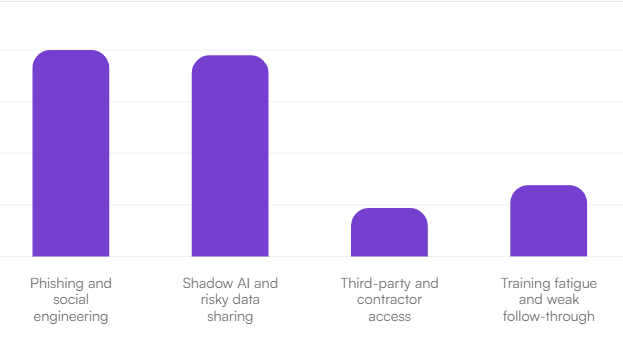
Reader responses when asked, “What’s your biggest Cybersecurity Awareness Month challenge?” Source: Dark Reading
The following are nine tips that can move the dial on that enterprise risk in very real ways. A common thread for all of these is the fact that attackers win by abusing convenience, familiarity, and human trust, whether the issue is SEO poisoning, ClickFix, session hijacking, dark patterns, or dodgy ads on Facebook. That’s why awareness training still matters, and why it shouldn’t be a once-a-year affair, but an everyday focus on a set of specific, repeatable habits backed by stronger enterprise safeguards.
For security leaders, that makes Cybersecurity Awareness Month a chance to do more than remind users to “be careful.” It is an opportunity to push for better defaults: phishing-resistant MFA, tighter privilege controls, better reporting paths, safer browsing habits, stronger executive protection, and more realistic guidance for work that happens outside the office. The goal is to make the safe action the default action, and to help employees recognize the red flags before a routine click becomes a business problem.
Embrace cybersecurity awareness in October and beyond with Dark Reading’s curated hub for security leaders — featuring expert news, analysis, and insights for hardening enterprise defenses in areas like identity security, AI risk, social engineering, supply chain, and more.
Tip 1: Don’t Expect AI Models to Secure Themselves
Watch the video on this cybersecurity awareness tip from Becky Bracken, Media & Projects Director at Dark Reading, on LinkedIn.
As enterprises look to embrace agentic AI, they’re sorting through frontier models, open-weight alternatives, and overseas offerings, and much of the focus is evaluating the safeguards that, say, Claude might have vs. an open-weight alternative like Meta’s Llama series. But for business leaders, the key question is not which model is inherently safe, it’s whether your organization has put adequate controls around it. That means treating AI just like any other high-impact enterprise system that can be misconfigured, manipulated, abused, or compromised.
Every model type comes with tradeoffs. Frontier models may offer stronger vendor tooling, safety features, and governance support, but they can also introduce concentration and third-party risk. Open-weight models can give enterprises more transparency and control, but that control comes with more responsibility for hardening, patching, monitoring, and misuse prevention. Either way, the burden is on the enterprise.
For Cybersecurity Awareness Month, the practical takeaway is to assume compromise and build from there. Security teams should treat model weights, code, training data, prompts, plugins, APIs, and downstream applications as one attack surface. Limit what models can access. Restrict permissions. Segment AI workloads from critical systems. Log activity aggressively. Test for prompt injection, data leakage, and identity abuse. And keep humans in the loop for consequential actions, especially where money, customer data, or operational decisions are involved.
This is a golden opportunity for cybersecurity teams to become business enablers in the best sense of the term. AI will move fast, vendors will keep promising better safeguards, and the market will keep generating noise. But the durable security advantage will come from steady internal discipline. AI models can help the business, but it cannot be trusted to protect the business.
Tip 2: Teach Employees to Spot ClickFix Before It Spots Them
Watch the video on this cybersecurity awareness tip from Alex Culafi, Senior News Writer at Dark Reading, on LinkedIn.
ClickFix is a simple but effective attack because it exploits something security teams deal with every day: people trying to solve a problem quickly. The user lands on a compromised or malicious website, a phishing page, or a fake browser-based meeting screen, and sees what looks like a normal verification or troubleshooting prompt.
But instead of asking them to check a box, the page tells them to open a system tool — often with Windows + R — and paste in a command that the site has already copied to their clipboard. Once they do, they can trigger the compromise themselves. Security researchers note that this technique has risen sharply and often relies on fake CAPTCHA or error messages that make the request seem routine.
No legitimate CAPTCHA, website, or meeting platform should ever ask a user to open Run, PowerShell, Terminal, or Command Prompt and paste in a script. That should be treated as an immediate red flag. The attack works precisely because it looks like a harmless fix and can sidestep some browser-based protections by pushing the user to execute the command themselves.
Organizations should build this into awareness training now. Tell employees to stop immediately if a website asks them to copy-and-paste commands, press unusual key combinations, or “fix” an issue through a local system tool. Reinforce a simple rule: if a prompt moves from the browser into the operating system, assume it is suspicious until IT says otherwise. Also make it easy to report these incidents fast, because early reporting can help security teams contain the damage and identify affected users quickly. Restricting access to system tools where appropriate can add another layer of defense.
Tip 3: Stay Away From Meta
Watch the video on this cybersecurity awareness tip from Rob Wright, Senior News Director at Dark Reading, on LinkedIn.
For Cybersecurity Awareness Month, here’s a useful reminder for business leaders and employees alike: treat social media ads as untrusted content. According to Gen Digital research, nearly one in three (31%) of ads on Instagram and Facebook lead to scams, phishing pages, or malware.
And according to Reuters, Meta is charging higher premiums for advertisers that are considered risky. So not only have these platforms turned into a virtual minefield of scams, but Meta has a financial incentive to keep these ads online.
That matters because malicious ads often don’t look malicious. They may mimic legitimate brands, use convincing creative, and point to spoofed URLs that appear credible at first glance. Even security-aware users can get caught. The real danger is that these ads exploit trust, urgency, and familiarity — exactly the tactics that work on busy professionals who are clicking quickly on personal devices outside the protections of corporate security tools.
The best defensive habit is simple: do not click directly from social ads to make purchases, log in, or share payment information. If an offer looks legitimate, navigate to the brand’s site manually, use a bookmarked link, or search for the company independently. Before entering credentials or card details, verify the domain carefully. Organizations should reinforce this behavior in security awareness training, especially for executives and remote workers who often blend personal and professional device use.
Caution remains the first line of defense. Encourage employees to use payment cards with fraud alerts, enable multifactor authentication on shopping and social accounts, and maintain healthy skepticism toward “limited-time” deals delivered through ad feeds.
Tip 4: Your Executives’ Families Are Part of the Attack Surface
Watch the video on this cybersecurity awareness tip from Arielle Waldman, Features Writer at Dark Reading, on LinkedIn.
Ransomware has moved beyond encrypting systems and stealing data. Increasingly, attackers are pressuring organizations by targeting the people around their leaders — spouses, children, relatives, and close friends.
The Semperis 2026 Ransomware Risk Report found that 37% of attacks involved threats against employees’ friends or family members. In other words, if attackers can’t break your defenses fast enough, they may try to break your people instead. AI is accelerating this shift by making reconnaissance faster and cheaper, and threat actors can mine social media, public records, leaked data, and digital breadcrumbs to map relationships, impersonate trusted contacts, and build highly convincing social engineering campaigns.
For Cybersecurity Awareness Month, organizations should expand executive protection beyond the corporate perimeter. Start with digital footprint reduction: encourage executives and family members to limit public exposure, remove unnecessary personal details from social profiles, and use aliases or less identifiable display names where practical. Establish family verification procedures, including safe words or challenge-response phrases, but rotate them regularly because any phrase used in a compromised channel should be treated as burned.
Most importantly, extend basic cyber-hygiene to the household: require strong unique passwords, enforce multifactor authentication on personal and shared accounts, secure home networks and connected devices, and train family members to recognize urgency-based scams, impersonation attempts, and suspicious contact. A child’s gaming console, a spouse’s reused password, or a relative’s overshared profile can become the opening attackers need.
Tip 5: Your Executives Need More Security Friction, Not Less
Watch the video on this cybersecurity awareness tip from Fahmida Rashid, Editor-in-Chief at Dark Reading, on LinkedIn.
Security awareness works better when it feels practical and relevant, not like a mandatory lecture. But one lesson is worth stating plainly: some employees need more protection simply because they hold more power, more access, and more sensitive information. That starts with the C-suite, but it also applies to executive assistants, finance leaders, admins, and anyone else with privileged access.
Executives are high-value targets because they combine authority, visibility, and convenience-driven work habits. They approve payments, access sensitive strategy, and often log in from airports, hotels, and personal devices. That makes them especially attractive for phishing, impersonation, business email compromise, deepfake scams, and data theft. The right response is not to make life easier for them. It is to add smart friction in the places that matter most.
A strong executive protection program should include:
-
Phishing-resistant MFA, ideally hardware-based rather than SMS codes
-
Just-in-time privileged access instead of standing elevated permissions
-
Dedicated, locked-down devices for sensitive work
-
Stronger email and DLP controls to catch unusual forwarding, sharing, or exfiltration patterns
-
Focused coaching for executives and their inner circle, including assistants and chiefs of staff
-
Guidance for family and home networks, because executive risk doesn’t stop at the office
Organizations can focus in on “white-glove” security, which means tighter controls, better support, and faster escalation when something looks off. If a control feels mildly annoying, that may be a sign it is doing its job.
Tip 6: Dark Patterns Are a Security Problem, Not Just a UX Annoyance
Watch the video on this cybersecurity awareness tip from Arielle Waldman, Features Writer at Dark Reading, on LinkedIn.
Dark patterns are usually discussed as a consumer issue — oversized “Accept All” buttons, hidden opt-outs, hard-to-close pop-ups, confusing unsubscribe flows, and prompts designed to push users into sharing more than they intended. But for businesses, they create a security problem too.
These design tricks train people to click quickly, surrender data reflexively, and ignore warning signs. Over time, that weakens judgment. Employees who get used to manipulative prompts may be less likely to notice when a request is truly malicious — whether that’s a fake consent banner, a spoofed login page, a bogus app permission screen, or a prompt asking for sensitive information. Dark patterns blur the line between annoying and dangerous.
For organizations, the goal should be to treat dark-pattern awareness as part of security awareness. Start by reminding employees that convenience defaults are rarely the safest settings. Public profiles, broad calendar visibility, third-party integrations, and data-sharing permissions are often enabled by default. Employees should be encouraged to review privacy and sharing settings manually rather than assume the platform chose the secure option. It’s also worth checking authenticator app settings for too-broad sharing privileges.
Another good rule: if you didn’t sign up for a tool, don’t create an account just because an email nudges you to. Unapproved signups can create shadow accounts that IT and security teams can’t monitor or secure.
Finally, build a reporting culture around anything that feels off — surprise charges, mystery accounts, unusual permissions, or suspicious prompts. The more comfortable employees are raising small concerns, the easier it is to catch bigger issues before they spread.
Tip 7: Secure the Whole Login Journey, Not Just the Password
Everyone knows password hygiene remains a challenge for most businesses, but risk in the login journey increasingly extends to the other seams around identity — the moments where users, devices, sessions, and recovery workflows intersect.
The threats include quishing, where a user scans a QR code from an email, webpage, or physical sign, and lands on a convincing but malicious login screen. There’s also push fatigue, where attackers bombard a user with approval requests until one gets accepted. And it includes session hijacking and token theft, where the attacker skips the password entirely and hops into an already authenticated session. Add SIM swapping to intercept SMS-based recovery, and the modern login chain starts to look brittle in several different places.
The long-term fix is to move toward phishing-resistant authentication, including FIDO2 security keys and passkeys, backed by enterprise controls that verify context, not just credentials. That means checking device posture, monitoring session behavior, requiring managed devices for sensitive systems, and reauthenticating when risk changes. In short: don’t just trust the login — trust the device, the session, and the user behavior behind it.
However, if this kind of full passkey rollout is not on the docket yet, there are practical steps organizations can take now to reduce login risk:
-
Turn on number matching for push-based MFA
-
Reduce or eliminate SMS-based authentication where possible
-
Throttle repeated approval prompts
-
Shorten session lifetimes for high-risk apps
-
Require managed-device access for sensitive systems
-
Trigger reauthentication when device posture changes
And meanwhile, employee training should focus on a few clear habits: don’t scan login QR codes from unsolicited messages or unverified sources, for one, and never approve an unexpected SMS verification push.
To prevent session hijacking, log out of accounts when you finish using them, rather than just closing the browser tab. And avoid public Wi-Fi when you’re doing sensitive things.
And finally, on the SIM-swapping front, switch from SMS MFA to Authenticator Apps that can’t be intercepted via a phone network. You can also request that account changes require physical ID in-store or multi-layered, out-of-band authentication before processing SIM changes.
Account takeover attacks are a bugbear that is unlikely to disappear anytime soon, but increasing friction and cost for attackers throughout the log-in process can really help, and, hopefully, get you out of the low-hanging fruit category at the very least.
Tip 8: Don’t Trust the Wi-Fi at the Rink
Watch the video on this cybersecurity awareness tip from Rob Wright, Senior News Director at Dark Reading, on LinkedIn.
Fall youth sports season means many parent-professionals are working from the sidelines — at soccer fields, hockey rinks, football stadiums, and school gyms — often on whatever free Wi-Fi happens to be available. That may not sound as risky as logging on at a major airport or hotel, but it still creates an opportunity for mistakes that attackers, pranksters, or opportunistic snoops can exploit.
Sophisticated nation-state actors are probably not camping out at your local rink. But there’s still considerable risk if you connect to the wrong network. A hotspot with a name that closely resembles the venue’s legitimate Wi-Fi can be enough to trick a busy parent checking email between periods or joining a meeting from the bleachers. Even a spoofed network set up as a joke can expose traffic, credentials, or session data if employees are careless.
Business readers that want to avoid their employer’s penalty box should treat public connectivity anywhere as untrusted by default. Before joining a network, verify the exact Wi-Fi name with venue staff or posted signage. Disable auto-join so your device does not connect to similarly named networks without your knowledge. Use only approved secure remote access tools, keep endpoint protections enabled, and avoid handling sensitive work such as admin access, financial approvals, or password resets over public Wi-Fi unless it is absolutely necessary.
If you need connectivity, a personal hotspot is often the safer option — but only if it is configured properly. Use a strong password, change the default network name if it reveals your identity, and make sure the hotspot is not left open to nearby devices.
The broader lesson for Cybersecurity Awareness Month: low-profile locations can still produce real security failures. The setting may feel routine, but the network risk is not.
Tip 9: Treat Search Results as Untrusted Until Proven Otherwise
Watch the video on this cybersecurity awareness tip from Alex Culafi, Senior News Writer at Dark Reading, on LinkedIn.
SEO poisoning turns a routine Google search into an attack path. Threat actors either build lookalike websites or compromise legitimate ones, then manipulate content and code so those pages rank highly in search results. The idea is that user searching for software, a login page, or a partner site might simply click the top result, which happens to be poisoned, and subsequently hand over credentials or download malware.
Guidance on spotting fake websites specifically warns that SEO poisoning can push malicious sites to the top of search results, and Trend Micro’s 2026 research on more than 35,000 fake World Cup-related sites shows how easily attackers can industrialize fake-site campaigns around high-interest topics.
For business users, the safest habit is to stop trusting search rankings as a signal of legitimacy. Before clicking, inspect the URL for misspellings, extra words, odd country codes, or brand names that look slightly off. After clicking, be suspicious if the page immediately pushes a download, asks for credentials too early, triggers repeated redirects, throws pop-ups, or trips a browser warning. Those are strong signs that something is wrong.
Organizations should reinforce a few simple rules in awareness training:
-
Use bookmarks or manually typed URLs for key business apps, vendors, and partner portals.
-
Verify domains before downloading software or entering credentials.
-
Treat urgent install prompts and so-called ClickFix instructions as red flags.
-
Report suspicious search results, spoofed pages, and accidental downloads to IT immediately.
-
Isolate the device and change credentials quickly if a user may have interacted with a fake site.
The practical message for Cybersecurity Awareness Month: search is a convenience layer, not a trust layer. Employees do not need to become threat hunters, but they do need to slow down long enough to verify where a search result is actually taking them. That pause can prevent a compromise.
Read more about: